Docker OpenCV CUDA Python VSCode RTX 3060
To use CUDA acceleration with OpenCV, pip install opencv-python simply won’t cut it. CUDA support requires building OpenCV from source. In this post, I’ll show you how to set up a clean, isolated development environment using Docker — without polluting your host system — and debug your code directly inside the container using VSCode.
Why Can’t We Just Use pip install?
The opencv-python package on PyPI is a generic build with no CUDA support. CUDA features must be enabled at compile time by linking against the CUDA libraries.
| Method | CUDA Support | Notes |
|---|---|---|
| pip install opencv-python | ❌ | Generic build, CPU only |
| Build from source (host) | ✅ | Pollutes host environment |
| Docker + build from source | ✅ | Isolated, clean — recommended |
1 Prerequisites
Make sure the following are installed on your host machine:
- NVIDIA Driver (verify with nvidia-smi)
- Docker
- nvidia-container-toolkit
# Install nvidia-container-toolkit
sudo apt install nvidia-container-toolkit
sudo systemctl restart docker

# Verify GPU is accessible inside Docker
docker run --gpus all --rm nvidia/cuda:12.8.0-base-ubuntu22.04 nvidia-smiYou do NOT need to install the CUDA Toolkit (nvcc) on your host. It’s already included inside the Docker image.
2 Run the NVIDIA Official CUDA Image
docker run --gpus all -it \
  --name opencv-cuda \
  -v /your/project/path:/workspace \
  nvidia/cuda:12.8.0-cudnn-devel-ubuntu22.04 \
  bash
Verify GPU and nvcc inside the container:
nvcc --version
nvidia-sminvcc: NVIDIA (R) Cuda compiler driver Cuda compilation tools, release 12.8 NVIDIA GeForce RTX 3060 | CUDA Version: 12.8
3 Install Dependencies
If apt is slow, switch to a faster mirror first:
# Switch to a faster mirror (optional)
sed -i 's/archive.ubuntu.com/mirror.kakao.com/g' /etc/apt/sources.list
sed -i 's/security.ubuntu.com/mirror.kakao.com/g' /etc/apt/sources.list

apt update && apt install -y \
  python3 python3-pip python3-dev \
  cmake git g++ \
  libgtk2.0-dev pkg-config \
  libavcodec-dev libavformat-dev libswscale-dev

pip3 install numpy
4 Build OpenCV from Source
cd /workspace

git clone https://github.com/opencv/opencv.git
git clone https://github.com/opencv/opencv_contrib.git

cd opencv && mkdir build && cd build

cmake .. \
  -D WITH_CUDA=ON \
  -D OPENCV_CUDA_ARCH_BIN="8.6" \
  -D CUDA_ARCH_BIN="8.6" \
  -D CUDA_ARCH_PTX="" \
  -D OPENCV_EXTRA_MODULES_PATH=/workspace/opencv_contrib/modules \
  -D WITH_CUBLAS=ON \
  -D BUILD_opencv_python3=ON \
-D CMAKE_BUILD_TYPE=ReleaseRTX 3060 → 8.6 | RTX 3090 → 8.6 | RTX 4090 → 8.9 | RTX 5070 Ti → 8.9 ~ 9.0
After cmake completes, verify these lines in the output:
--   NVIDIA CUDA:   YES (ver 12.8, CUFFT CUBLAS)  ✅
--     NVIDIA GPU arch:  86                        ✅
--   cuDNN:          YES (ver 9.7.0)               ✅
--   Python 3:
--     Libraries:    /usr/lib/.../libpython3.10.so ✅
--     numpy:        .../numpy/_core/include       ✅
Build and install (takes 30min ~ 1hr):
make -j$(nproc)
make install
5 Verify the Build
python3 -c "
import cv2
print('OpenCV version:', cv2.__version__)
print('CUDA devices:', cv2.cuda.getCudaEnabledDeviceCount())
"OpenCV version: 4.14.0-pre CUDA devices: 1
6 Save the Container as an Image
If you exit the container, everything will be lost (due to –rm). Commit it as a reusable image from a new host terminal:
# On the host
docker ps  # Get container ID
docker commit <container_id> opencv-cuda:latest

# Verify
docker images | grep opencv-cudaThe resulting image will be around 13GB. Using a multi-stage Dockerfile build can reduce this to 4–5GB.
7 Debug Inside the Container with VSCode
Install these two VSCode extensions:
- Remote – SSH (already installed)
- Dev Containers (install additionally)
Start the container:
docker run --gpus all -it \
  --name opencv-cuda \
  -v /your/project/path:/workspace \
  opencv-cuda:latest bash
In VSCode: click the blue button at the bottom-left → Attach to Running Container → select opencv-cuda
Create .vscode/launch.json:
{
  "version": "0.2.0",
  "configurations": [
    {
      "name": "Python Debugger: Current File",
      "type": "debugpy",
      "request": "launch",
      "program": "${file}",
      "console": "integratedTerminal"
    }
  ]
}
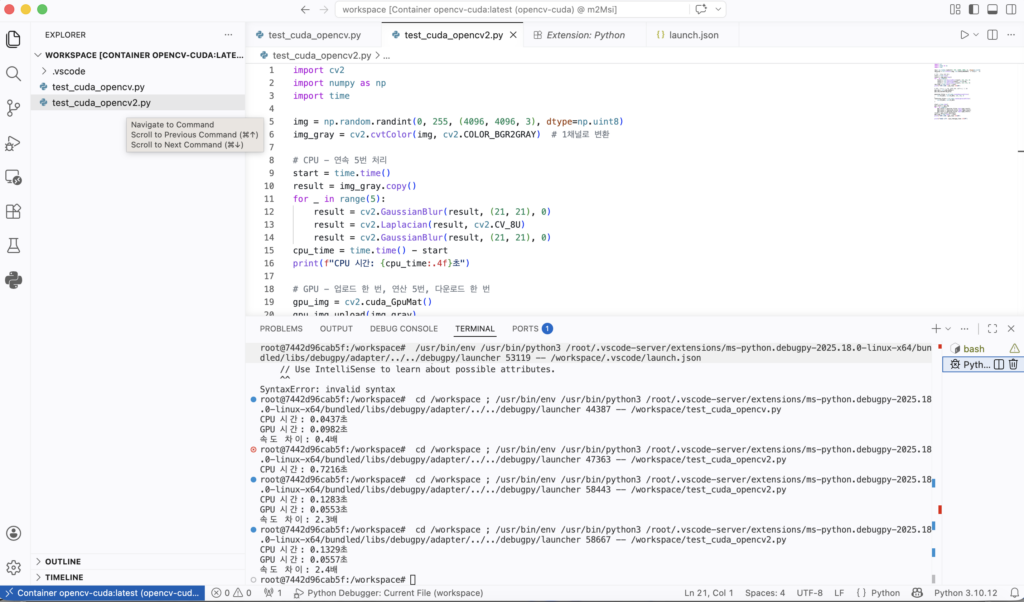
8 CPU vs GPU Speed Comparison
First Attempt — Single GaussianBlur
import cv2
import numpy as np
import time

img = np.random.randint(0, 255, (4096, 4096, 3), dtype=np.uint8)

# CPU
start = time.time()
result_cpu = cv2.GaussianBlur(img, (21, 21), 0)
cpu_time = time.time() - start
print(f"CPU time: {cpu_time:.4f}s")

# GPU
gpu_img = cv2.cuda_GpuMat()
gpu_img.upload(img)
start = time.time()
gpu_filter = cv2.cuda.createGaussianFilter(cv2.CV_8UC3, cv2.CV_8UC3, (21, 21), 0)
result_gpu = gpu_filter.apply(gpu_img)
result_gpu.download()
gpu_time = time.time() - start
print(f"GPU time: {gpu_time:.4f}s")CPU time: 0.0437s GPU time: 0.0982s GPU is 0.4x slower 😅
The GPU was slower because the upload/download overhead exceeded the actual computation time for a single operation.
Second Attempt — Chained Operations (with Error)
laplacian_filter = cv2.cuda.createLaplacianFilter(
    cv2.CV_8UC3, cv2.CV_8UC3  # ← 3-channel attempt
)OpenCV Error: (-215:Assertion failed) scn == 1 || scn == 4 in function 'LinearFilter'
Cause: The CUDA Laplacian filter only supports 1-channel (grayscale) or 4-channel images. 3-channel BGR images are not supported.
Fixed Code — Grayscale + 5 Chained Operations
import cv2
import numpy as np
import time

img = np.random.randint(0, 255, (4096, 4096, 3), dtype=np.uint8)
img_gray = cv2.cvtColor(img, cv2.COLOR_BGR2GRAY)  # Convert to 1 channel

# CPU
start = time.time()
result = img_gray.copy()
for _ in range(5):
    result = cv2.GaussianBlur(result, (21, 21), 0)
    result = cv2.Laplacian(result, cv2.CV_8U)
    result = cv2.GaussianBlur(result, (21, 21), 0)
cpu_time = time.time() - start
print(f"CPU time: {cpu_time:.4f}s")

# GPU — upload once, compute 15 times, download once
gpu_img = cv2.cuda_GpuMat()
gpu_img.upload(img_gray)

gaussian_filter = cv2.cuda.createGaussianFilter(cv2.CV_8UC1, cv2.CV_8UC1, (21, 21), 0)
laplacian_filter = cv2.cuda.createLaplacianFilter(cv2.CV_8UC1, cv2.CV_8UC1)

start = time.time()
gpu_result = gpu_img
for _ in range(5):
    gpu_result = gaussian_filter.apply(gpu_result)
    gpu_result = laplacian_filter.apply(gpu_result)
    gpu_result = gaussian_filter.apply(gpu_result)
result = gpu_result.download()
gpu_time = time.time() - start
print(f"GPU time: {gpu_time:.4f}s")
print(f"Speedup: {cpu_time/gpu_time:.1f}x")CPU time: 0.1283s GPU time: 0.0553s Speedup: 2.3x 🎉
Key Takeaways
| Point | Detail |
|---|---|
| pip install opencv | No CUDA — must build from source |
| Why Docker | Isolated environment, host stays clean |
| GPU slower than CPU | upload/download overhead > computation time |
| GPU faster than CPU | More chained operations = better GPU efficiency |
| Laplacian error | CUDA only supports CV_8UC1 (grayscale), not BGR |
| VSCode debugging | Dev Containers lets you F5-debug inside a container |